


.png)
Animal Welfare in Dairy Farming by Alvoar by ESGpec
Technology, knowledge and animal welfare at the heart of dairy production
Participate in the training, install the PEC Scores app, and apply the animal welfare assessment to the farms you monitor. A simple yet powerful action to improve sustainability and strengthen animal care.
Why does animal welfare matter?
Animal welfare is one of the pillars of sustainability in dairy farming. Assessing this aspect clearly and using technical criteria helps improve farm performance, the image of production, and access to more demanding markets.
The ESGpec + Alvoar partnership represents a practical and accessible opportunity to diagnose, understand, and improve the welfare of the herds you monitor. All this with technical support, a certificate of participation, and a user-friendly digital tool.
Featured Benefits

More well-being, more milk
Healthy and comfortable animals produce better.

Clear diagnosis
Animal welfare status represented on a scale from 0 to 10.

Easy
to use
Application available for Android and iOS, even without internet in the field.
What does the technician need to do?

to know
Participate in online training (duration 2 hours).

install
Download and install the App available for Android and iOS.
.jpg)
apply
Apply the BEA Score to farms.
BEA Score
The BEA Score is a digital and gamified diagnosis focused on animal welfare on farms.
The tool generates a score from 0 to 10, indicating the farm's level of attention to the five domains of animal welfare: adequate nutrition, comfortable environment, health and sanity, behavioral freedom, and positive emotional state.
In addition to facilitating dialogue with producers, the BEA Score delivers a report with results and practical guidance, supporting the development of personalized, data-driven action plans.


FAQ - Frequently Asked Questions
About the training
Do I need to attend all trainings?
No. You must attend only one of the three online group sessions, each lasting two hours. They are designed to offer flexible scheduling.
Will I have a certificate?
Yes! To receive the certificate you must:
-
Participate in collective training
-
Pass the knowledge validation quiz
-
Complete the final training evaluation
Is participation in collective training mandatory?
Yes. Participation in one of the sessions is mandatory for activities related to the topic to be carried out.
Will I receive guidance on how to fill out the scores?
Yes! The training will explain the entire process of filling out the BEA Score, with a timeline for questions. The PEC Scores app was also developed with a simple and intuitive interface.
About the application and filling
What data do I need to start filling it out?
You will need:
-
Producer's full name
-
Farm name
-
Municipality
-
Producer's CPF
This information is requested at the beginning of the diagnosis.
I changed my phone. Will I lose my data?
If the data has already been submitted, it is saved in the cloud. Only if the data was entered offline and not submitted before the exchange will the data be lost. Therefore, we always recommend submitting it after completing the form.
Do I need internet access to apply the BEA Score?
Just open the form before heading to the farm. After that, you can fill it out offline and the data will be sent when you're connected again.
What happens if there is an error or doubt when filling out the scores?
You can count on the ESGpec team's support to clarify any questions or make corrections. You can resend a diagnosis and request deletion of the previous one, if necessary.
I changed my phone. Will I lose my access or need another voucher?
No. The voucher is linked to your CPF. Simply reinstall the app and validate again.
About using the voucher
Can I use someone else's voucher?
No. The voucher is personal and non-transferable, linked to the registered CPF.
How will I receive my Voucher?
It will be sent by the ESGpec team, the day after the training, by email or WhatsApp.
Can I pass my voucher to the producer?
No. The diagnosis must be completed by the participating technician. The producer can monitor it, but does not complete it.
About farm application and support
Do I need to fill it out on all the farms I serve?
Yes. The diagnosis must be applied to all farms.
Will support be available throughout the project?
Yes! From alignment to final shipping, you can count on ESGpec's technical support.
What is the deadline for completing the BEA Score on the farm?
Until 11/15/2025.
How does support work during the project?
You will have:
-
Access to an exclusive WhatsApp group
-
Direct individual service with the ESGpec team
About sending data and results
Will the analyses generate some type of report or certification?
This is not a formal certification, but the results serve as a reliable technical basis for property improvement actions and future qualification initiatives.
Who will have access to the consolidated project results?
Alvoar will have access to the general results for the purposes of improvement, training and communication strategies, always respecting individual confidentiality.
Can I use the project results in my own presentations or reports?
Yes, as long as the principles of confidentiality and responsible use of data are respected. Reports generated on farms are available for technical use.
Will the producers receive some kind of recognition?
We are evaluating the possibility of awarding or recognizing the project's highlights. If this happens, any identification will only be made with the producer's express authorization.
How will farm data be used?
The data will be used only in aggregated and anonymous form in general project reports. No producer will be exposed individually.
Step by step for all accesses
(in the case of first access, it is the continuation of the previous items)
Step by step for all accesses
(in the case of first access, it is the continuation of the previous items)
01
Starting to use the App
On the app's home screen, you'll find two items: "PEC scores" and "PEC solve." Select the first option, "PEC scores."


02
Starting filling
The next step involves selecting the "Fill Out the Form" option.
Check the 'Check scores' function in the 'Additional information' area on this page.
03
Selected activity
Choose the "Dairy Farming" option.


04
Selecting the score type
Select BEA Score.
05
Navigating through information screens
Go through the App's instructions, related to the selected score, by clicking on ' Next' and 'OK'.


06
Informing you that you have a Voucher
Once you've obtained your voucher from the ESG PEC team, click 'I have a voucher.' This voucher is required to use the features.
The voucher is generated by the ESGPec team and is associated with the person's CPF.

07
Entering your voucher
Enter your Voucher and click 'Confirm'.
The Voucher is a 6-digit code that includes numbers and letters. Letters can be entered in uppercase or lowercase; both are accepted.
If you have forgotten your Voucher, please contact us by email at contato@esgpec.com.br, identifying yourself with your CPF.


08
Reporting property data
The property details are very important. Fill them out carefully, as they will also be used as the header for the PDF report that can be generated after completion. Click 'Continue'.
IMPORTANT INFORMATION:
-
When you register a property, your data is stored in the app. When you create a new survey of an already registered farm, enter your initials, and the system automatically retrieves the data, making filling it out easier.
09
Navigating through screens
Go through the sequence of 3 information screens, click on 'Next', ' Next' and 'Start' to access the Score and start filling it out.


Step by step guide for first access only
01
Download the App
For iOS users, the application can be downloaded from the App Store, while for Android users, it can be downloaded from Google Play.
In the search bar, type "ESGPEC" (together) to locate the application (see the image for reference) and proceed with the download.


02
Open the App and go through the first-time access welcome screens.
The first time you access the App, a sequence of 3 screens will be shown, click on 'Next', 'Next ' and 'OK'.
03
Enter your CPF when accessing for the first time after installation
To start using the application, the first step is to register your CPF, which will be linked to your account.
Enter and click 'Continue'.
NOTE: If you reinstall the app on another phone, the procedure will be the same. The CPF you used previously is your account identifier.


04
Complete your registration
On this screen, enter your details. The CPF number you entered on the previous screen will already be filled in. Complete the information and click 'Continue'.
Important: The phone number you provided will receive a verification code via SMS. If you enter the phone number incorrectly, it will be associated with your CPF (Brazilian Taxpayer Registry), and you will not be able to receive the code via SMS or reinstall the app, as your CPF is associated with the wrong phone number. In this case, please contact contato@esgpec.com.br. Please double-check the phone number you provided before confirming. If you change your phone number, please contact support to update your registration.
05
Enter the verification code
You'll receive a verification code via SMS, which you must enter on this screen. Click 'Validate Code' to begin your full in-app experience.

What does the technician need to do?

Loss of connection
If your internet connection goes out while you're filling out the questionnaire, there's no need to worry, as the app allows you to continue. However, if you reach the end of the questionnaire and still don't have internet access, you won't be able to access your score.
If you plan to start filling out the form in a location without an internet connection, we suggest opening the app and starting the form in a location with an internet connection. Keep the app open and you can use it without internet access.
In this case, close the application, without canceling the filling, just close the App by dragging the screen, as with any other application.
When you are back in an area with an internet signal, you can resume filling out the form. Just open the app and you will return to the stage where you left off, allowing you to generate your final score.

Canceling the filling
If, while filling in the form, you click the exit button, the filling will be canceled and the information, if included, will be lost.
If you accidentally tap the item, the app will display a warning message asking if you really want to cancel the process. If you tapped by mistake, click NO on this message. If you really want to cancel, click YES.

Querying larger question statements
Longer texts may display a sidebar that needs to be scrolled to read the full question.

Help with questions
Many questions have a question mark icon in the upper right corner. In these cases, clicking on the question mark will provide you with relevant information related to the question, helping you deepen your understanding, gain knowledge, and ultimately support your completion.
In some cases, additional information will be displayed in the box. When more detailed information is available, the 'Access link' button will be available to view the complete information. The display of additional boxes depends on internet connection.
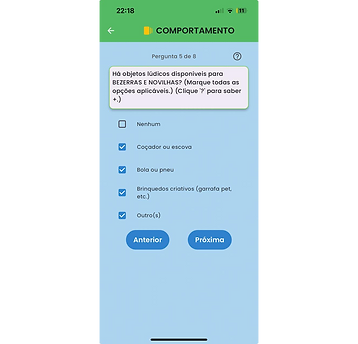
Questions with the option to select combinations of answers.
Questions that contain the words in parentheses (CHECK ALL THAT APPLY) allow you to select more than one item in your answers.

Consulting scores
Once you've completed a score and received the rating assigned to the property, you can view the information, issue, and share the full report in PDF format.
On the system's home screen, click on 'Check scores'.

Selecting the desired score
When you click on 'Consult scores', a screen will be displayed with all the scores, already filled in, of any type.
Select the desired item from the list.

Accessing options
After selecting an item from the listing, the information will be displayed and you can:
see answers on the screen or
share answers (send via WhatsApp, email, etc.)
ACESSE NOSSO BLOG!


BAIXE OS E-BOOKS PARA CONTINUAR APRENDENDO
Project developed by ESGpec and Educampo SEBRAE/MG
Project developed by ESGpec and Educampo SEBRAE/MG

Project developed by ESGpec and Educampo SEBRAE/MG
Project developed by ESGpec and Educampo SEBRAE/MG


